
NotebookLM vs Gamma: Which One Should Make Your Slides?
NotebookLM vs Gamma: Which One Should Make Your Slides?
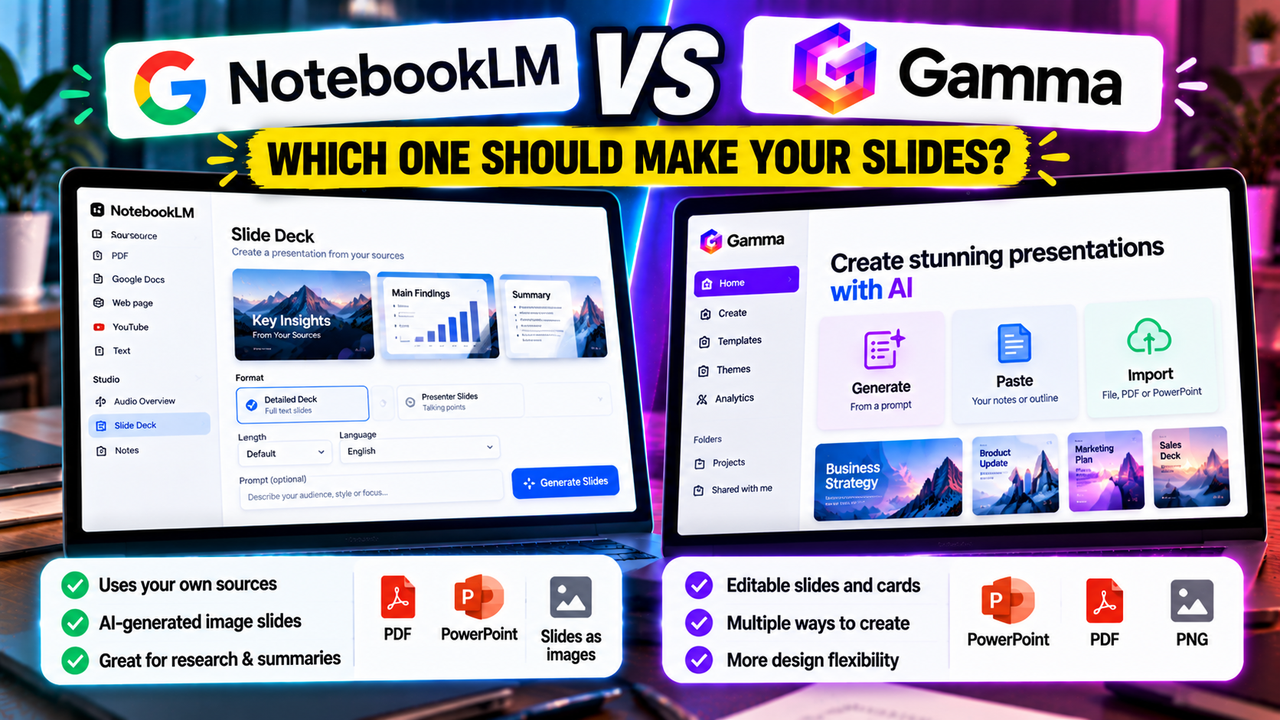
NotebookLM and Gamma can both turn your material into a slide deck, but they are built for different jobs. NotebookLM, which Google renamed Gemini Notebook in July 2026, is a research tool that builds slides only from the sources you upload and delivers each slide as a finished image. Gamma is a presentation maker that produces decks you can edit line by line, restyle and export. If you want a fast visual summary of documents you need to understand, choose NotebookLM. If you need a deck you will keep working on, choose Gamma.
A note on the name: Google's help pages now say Gemini Notebook, the product still lives at the same web address, and most people still search for NotebookLM. This article uses NotebookLM throughout.
NotebookLM vs Gamma at a glance
| NotebookLM (Gemini Notebook) | Gamma | |
|---|---|---|
| Built for | Researching and summarising your own sources | Creating presentations, documents and web pages |
| Starting point | Sources you add to a notebook | A prompt, pasted text or an imported file |
| What a slide is | One generated image | An editable card with text, images and layout blocks |
| Editing | Written revision requests per slide, delete, reorder | Direct editing, plus AI editing |
| Exports | PDF, PowerPoint (.pptx) | PDF, PowerPoint (.pptx), PNG |
| Editable in PowerPoint afterwards | No, each slide is a picture | Yes, with some formatting cleanup |
| Free plan | Yes, with a Google account | Yes, 400 one-time AI credits |
| Paid from | Google AI Plus, $4.99 a month (US) | Plus, around $10 a month |
| Branding on output | Watermark unless you are on Pro or Ultra | "Made with Gamma" badge on Free |
Checked 7 October 2026 against Google's and Gamma's help pages. Limits and prices change, so confirm on the official pages before you pay.
How each one builds a deck
NotebookLM starts from your sources
You create a notebook and add sources such as PDFs, Google Docs, web pages or YouTube videos. The free plan allows 50 sources per notebook. In the Studio panel you choose Slide Deck, and Google gives you four things to set:
- Format: Detailed Deck, which carries full text and is meant to be read, or Presenter Slides, which are cleaner and built around talking points.
- Length: short, default or long.
- Language.
- A prompt describing the audience, style or focus you want.
The deck generates in the background while you keep working in the notebook. Slide Decks arrived in late 2025 and were built on Google's Nano Banana Pro image model, which explains both the illustrated look and the fact that every slide is delivered as an image.
Gamma starts from an idea, text or a file
Gamma gives you three ways in: generate from a prompt, paste text you already have, or import a file such as a PowerPoint, Word document or PDF. When you paste or import, you choose whether Gamma should preserve your wording, condense it or write new content around it.
The result is a set of "cards". They behave like slides but can grow taller than a 16:9 frame, which matters when you export. On the free plan one prompt creates up to 10 cards. Paid plans raise that to 100.
Editing is the difference that decides most cases
In NotebookLM you cannot click into a slide and type. To change something you press Revise, write an instruction for the slide you want changed, and the tool regenerates. Google's help page says you can ask for text changes, layout changes or visual updates, and that every revision creates an entirely new slide deck. You can also delete a slide and drag thumbnails to reorder them.
That works for "make slide 4 shorter". It is slow for the small fixes that fill the last hour before a presentation: a wrong date, a client's name, a number that moved overnight. Each one is a written request and a wait.
Gamma works like an editor. You click on text and change it, move blocks around, swap a layout, apply a different theme to the whole deck, or ask its AI agent to rewrite a card. Agent edits use credits. Typing does not.
If more than one person will touch the deck, or if it will be revised after feedback, this alone usually settles the choice in Gamma's favour.
What you get when you export
NotebookLM offers two downloads: PDF and PowerPoint. The PowerPoint file opens and presents normally, but each slide holds a single picture. You cannot edit the words in PowerPoint, and uploading the file to Google Slides gives you the same pictures. Google's help page lists no direct Google Slides export. Third-party converters claim to rebuild these images into editable slides. We have not verified any of them.
Gamma exports PDF, PowerPoint and PNG on every plan, including Free, where a "Made with Gamma" badge is added. The PowerPoint file contains real, editable text. Gamma's help centre is open about what changes in translation: tables lose their rounded corners, gradient headings can become a single colour, frosted backgrounds fall back to a simpler style, and fonts may be substituted if you open the file in Google Slides. Tall cards can also need splitting to fit a standard slide. To get a deck into Google Slides, you export a PowerPoint file and upload it.
So Gamma's export is editable with cleanup, and NotebookLM's is presentable but locked. Our guide on whether AI can create a PowerPoint presentation explains why exported files behave differently from slides made inside PowerPoint, and can you use AI with Google Slides covers the Google side.
Accuracy and where the content comes from
This is NotebookLM's strong suit. Its answers and its decks are grounded in the sources you added, and its chat cites the passages it drew from, so you can check a claim against the original. For a literature review, a policy document or a long report, that is a real advantage.
It is still an AI output. Google warns that Slide Decks "may contain visual or factual inaccuracies". Because the words are part of an image, a wrong figure cannot be corrected by typing over it. You ask for a revision and check the new version.
Gamma depends on how you start. From a bare prompt, the AI writes the content from general knowledge, so facts and statistics need checking before you present them. From pasted or imported material with the preserve option, the deck stays close to your own text. Gamma is not designed as a citation tool, so tracing a claim on a card back to a page in your source is your job.
Price and limits
NotebookLM is free with a Google account. The free tier allows 100 notebooks and 50 sources per notebook. Higher limits come bundled with Google's AI subscriptions, priced in the US at $4.99 a month for Google AI Plus, $19.99 for Google AI Pro and from $99.99 for Google AI Ultra. Those subscriptions cover other Google AI features too, so you are not paying for slides alone. Google labels its usage limits "subject to change".
Two details to know before relying on it:
- Watermark. Google's plan page lists watermark removal on Pro and Ultra only, and says a visible watermark is always applied if you live in India, South Korea or Vietnam. Some third-party guides say only Ultra removes it, so check the plan page for your account.
- Age. Google states that Slide Decks are only available to users over 18.
Gamma has four individual plans:
- Free: 400 AI credits, given once. They do not refresh. Exports carry the badge.
- Plus: 1,000 credits a month, the badge removed, up to 100 cards per prompt. Around $10 a month.
- Pro: 4,000 credits a month, custom branding, API access, custom domains and viewer analytics. Around $20 a month.
- Ultra: 20,000 credits a month and the most advanced AI models.
Gamma's pricing page shows the exact price for your region, and annual billing is cheaper per month. Unused plan credits roll over up to double the plan size. Refunds are limited to the first three days and to accounts that have used few credits, so test on the free plan first.
For a wider look at what you can do without paying, see the best free AI presentation tools.
Which one should you choose?
Choose NotebookLM if:
- Your real task is understanding a set of documents, and the slides are a by-product.
- The deck is for a study group, a team briefing or your own revision, where nobody needs to edit it.
- Staying faithful to the source matters more than layout.
- You want to pay nothing, and a watermark is acceptable.
Choose Gamma if:
- You are presenting to clients, investors or senior people and will revise the deck after feedback.
- You need to change wording, numbers and layouts yourself, quickly.
- The file has to open in PowerPoint with text someone else can edit.
- You want your own branding, or want to share the deck as a link and see who viewed it.
Look past both if your team works inside PowerPoint or Google Slides all day and wants slides built natively in a company template. Add-ins such as Plus AI and Microsoft Copilot in PowerPoint create ordinary slides in the app you already use. Our roundup of the best AI add-ins for PowerPoint and Google Slides compares them.
Students and teachers often have both tools open, since both are free to start. AI presentation tools for students and educators looks at that situation in more detail.
Using the two together
Nothing forces you to pick one. A sensible division of labour is to do the research in NotebookLM and the deck in Gamma:
- Add your sources to a notebook and question them until you understand the material.
- Ask NotebookLM for an outline or a short report with the key points and figures.
- Check that text against the citations.
- Paste it into Gamma, choose to preserve your wording, and let Gamma handle layout and design.
You keep the source-grounded content and end up with slides you can edit. The same idea works with any document-based workflow, which we cover in how to turn a document or PDF into slides with AI.
Quick answers
Is NotebookLM now called Gemini Notebook? Yes. Google changed the name in July 2026 and its help pages use the new one. Existing notebooks carried over and the product remains a standalone app.
Can you edit NotebookLM slides in PowerPoint? You can open and present them, but each slide is an image, so the text cannot be edited there. Changes are made in NotebookLM with the Revise option.
Can Gamma build a deck from my own documents? Yes. It imports PowerPoint, Word and PDF files and accepts pasted text, with an option to keep your wording.
Which is cheaper? NotebookLM, for most people. Its free tier is ongoing, while Gamma's free credits are a one-time pool. Gamma costs more because it does more of the presentation work.
Next step
If you are leaning towards an editable deck, the Gamma listing sets out its plans, export behaviour and limits in one place, and Gamma alternatives shows what else works in the same way. If source-grounded summaries are what you need, start with the NotebookLM listing. Still undecided about the type of tool? How to choose an AI presentation tool walks through the decision, and the AI presentation makers category lists every option we cover.
Listings related to NotebookLM vs Gamma: Which One Should Make Your Slides?
NotebookLM
Google's AI research tool — grounded strictly in the sources you upload — that also generates slide decks and audio/video overviews. A useful outlier: free and accurate, but its PowerPoint export is image-based, not editable.

Plus AI
An AI add-in that generates and edits presentations natively inside Google Slides and PowerPoint — no separate app, no export step. Strong at improving existing decks, not just making new ones. Trial only, no free plan.
Gamma
An AI presentation maker that turns a prompt or a pasted document into a finished-looking deck in about a minute. A standalone web app — great free plan for on-screen decks, but clean PowerPoint export and branding are paid.

Microsoft Copilot for PowerPoint
Microsoft's AI built directly into PowerPoint — builds decks from a prompt, a Word doc or a PDF, all as native editable .pptx. Unmatched integration with your real files; no free tier, requires a paid Microsoft 365 + Copilot licence.