
Is MagicSlides Free? What the Free Plan Covers and What Paid Plans Cost
Is MagicSlides Free? What the Free Plan Covers and What Paid Plans Cost
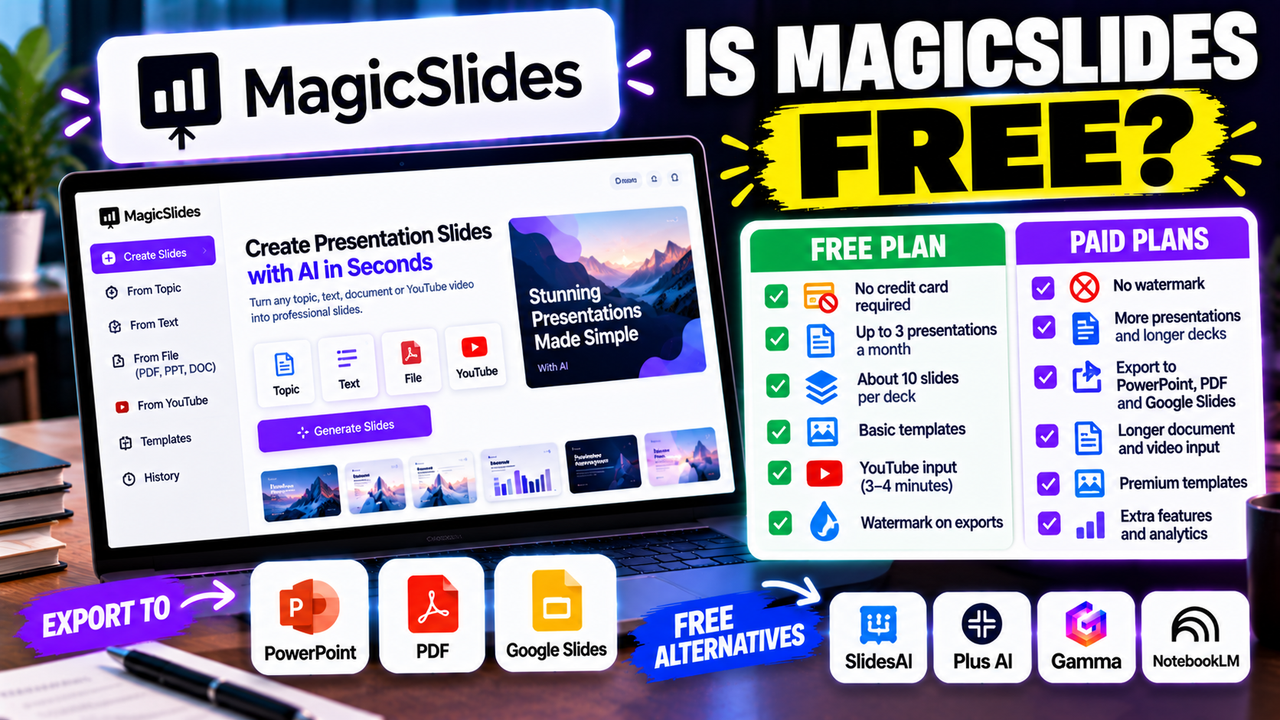
Yes, MagicSlides has a free plan, and you do not need a credit card to use it. It is a small one. The developer's own Chrome Web Store listing puts it at up to 3 presentations a month, and independent write-ups add that free decks stop at about 10 slides and carry a watermark. Paid plans start at $8 a month and remove the watermark.
That makes the free plan a fair way to test the tool and a weak way to produce decks you will hand to a client. Everything below was checked on 7 October 2026.
What the free plan includes
- Cost: $0, with no card needed to sign up. MagicSlides describes it as free forever.
- Volume: up to 3 presentations a month.
- Deck length: about 10 slides per deck, according to independent reviews.
- Watermark: yes. "No watermark" is listed as a benefit of every paid plan.
- YouTube input: videos of roughly 3 to 4 minutes.
- Templates: the basic set.
One caution about these numbers. MagicSlides' pricing page shows only its paid plans, so the free limits come from the developer's store listing and from two independent articles published in 2026 that agree with each other. If a limit matters to your project, confirm it inside your account before you depend on it.
What the paid plans cost
MagicSlides currently sells three individual plans.
| Essential | Pro | Premium | |
|---|---|---|---|
| Monthly billing | $8 a month | $16 a month | $29 a month |
| Annual billing | $80 a year (about $6.67 a month) | $149 a year (about $12.42 a month) | $279 a year (about $23.25 a month) |
| Presentations | 10 a month | 50 a month | 50 a month on the pricing page |
| Slides per deck | Up to 10 | Up to 15 | 50 or more |
| Watermark | None | None | None |
| Export | PDF, PowerPoint, Google Slides | PDF, PowerPoint, Google Slides | PPTX, PDF, PNG, JPG, HTML |
| Extras | Clone Slide, 10 a month | Clone Slide, 50 a month | Premium templates, extra AI models, document and spreadsheet tools, sharing with analytics |
Source: magicslides.app/pricing, 7 October 2026. The Premium allowance is described differently in different places. The pricing page says 50 presentations a month, while older descriptions say unlimited. Check the plan card before you buy if volume is the reason you are upgrading.
A licence is tied to one Google account email address, and MagicSlides says you can cancel at any time from the billing portal. There is also an API with its own pricing for developers.
What changes when you pay
The watermark goes. This is the main reason most people upgrade. A watermarked deck is fine for a class or an internal draft and awkward in front of a customer.
You can make more decks, and longer ones. Three decks of 10 slides covers an occasional presenter. A weekly team update or a full training session will not fit.
You can feed it more material. Third-party reviews report an input cap of roughly 2,500 characters on the free plan, rising to about 8,000 on Essential, 12,000 on Pro and 100,000 on Premium. MagicSlides does not show these figures on its pricing page, so treat them as a guide. The pattern is what matters: turning a long report or a long video into slides is a paid job. The developer's store listing says Pro handles YouTube videos up to 16 minutes and Premium up to an hour.
Export options widen. PDF, PowerPoint and Google Slides export are listed as features of the paid plans, with image and HTML formats on Premium.
Is the MagicSlides app free too?
MagicSlides runs in several places: a Google Slides add-on, a web app, a Chrome extension, and integrations for tools such as Figma and Telegram. The paid plans list all of them as included, and a licence is tied to one Google account, so it is safest to assume one allowance per account and not a separate one in each app. Google's Workspace Marketplace labels the add-on "free of charge with paid features", which is an accurate summary.
The add-on route has one practical benefit. MagicSlides says it creates presentations in Google Slides by default, so the result is an ordinary Google Slides file with editable text, and Google Slides has its own option to download a deck as a PowerPoint file. Sources disagree about how much exporting the free plan allows from the web app, so if a .pptx file is what you need, test that on your first free deck.
For more on working this way, see can you use AI with Google Slides.
Is the free plan enough for you?
Probably yes if you make a presentation now and then, your decks are short, and a watermark does not matter. That describes a lot of students, and anyone trying the tool before a purchase.
Probably no if you present to clients, need decks longer than 10 slides, want to convert long documents or long videos, or make slides every week. In those cases Essential at $8 a month is the cheapest fix, and Pro is the realistic choice once you pass 10 decks a month or need 15 slides.
A sensible test costs nothing: use one of your three free decks on a real presentation you have coming up, with your own material as the input. You will learn more from that than from a demo topic.
Promo codes and cheaper ways to pay
People search for MagicSlides promo codes, and we could not confirm any official one. The discount MagicSlides publishes is annual billing, which works out roughly 17% to 22% cheaper than paying monthly, depending on the plan. Coupon sites list codes that may or may not work. Nothing about the free plan requires one.
If you only need the tool for a single project, monthly billing and a cancellation afterwards will cost less than a year's commitment.
How it compares with other free options
MagicSlides is one of several tools that work with Google Slides, and their free offers differ in what they hold back.
| Tool | Free offer | Main restriction |
|---|---|---|
| MagicSlides | Free plan, no card | About 3 decks a month, watermark |
| SlidesAI | Free Basic plan | 12 presentations a year, 1,000 characters of input per deck |
| Plus AI | 7-day trial, card required | No ongoing free plan |
| Gamma | Free plan, no card | 400 one-time AI credits, badge on exports |
| NotebookLM | Free with a Google account | Slides are images, so the text cannot be edited |
MagicSlides gives you more free decks over a year than SlidesAI. SlidesAI and Plus AI are add-ins that work inside the slide editor, Gamma is a separate web app with its own format, and NotebookLM is a research tool that happens to make slides. Which restriction hurts least depends on how you work.
Two guides go deeper: the best free AI presentation tools compares free plans side by side, and the best AI add-ins for PowerPoint and Google Slides covers tools that work inside the apps you already use. If your starting point is a file, how to turn a document or PDF into slides with AI explains what to expect.
Next step
Start with the free plan and one real deck. If the watermark or the 3-a-month limit gets in your way, you will know which paid plan fits. The MagicSlides listing has the full picture of features, inputs and limitations, and the AI slide generators category shows similar tools if you want to compare before you sign up.
Listings related to Is MagicSlides Free? What the Free Plan Covers and What Paid Plans Cost
MagicSlides
MagicSlides is an AI slide generator that turns a topic, document, URL or YouTube video into a presentation — most notably as a native Google Slides add-on that produces editable Google Slides, with a web app and PowerPoint/PDF export as well.

SlidesAI
A lightweight text-to-slides add-in for Google Slides and PowerPoint: paste notes, a topic or a document and it generates a starter deck. Genuine free plan, low price, huge install base — thin on design and editing.

Plus AI
An AI add-in that generates and edits presentations natively inside Google Slides and PowerPoint — no separate app, no export step. Strong at improving existing decks, not just making new ones. Trial only, no free plan.

Gamma
An AI presentation maker that turns a prompt or a pasted document into a finished-looking deck in about a minute. A standalone web app — great free plan for on-screen decks, but clean PowerPoint export and branding are paid.
NotebookLM
Google's AI research tool — grounded strictly in the sources you upload — that also generates slide decks and audio/video overviews. A useful outlier: free and accurate, but its PowerPoint export is image-based, not editable.