
Gamma vs Decktopus: Which AI Presentation Maker Should You Use?
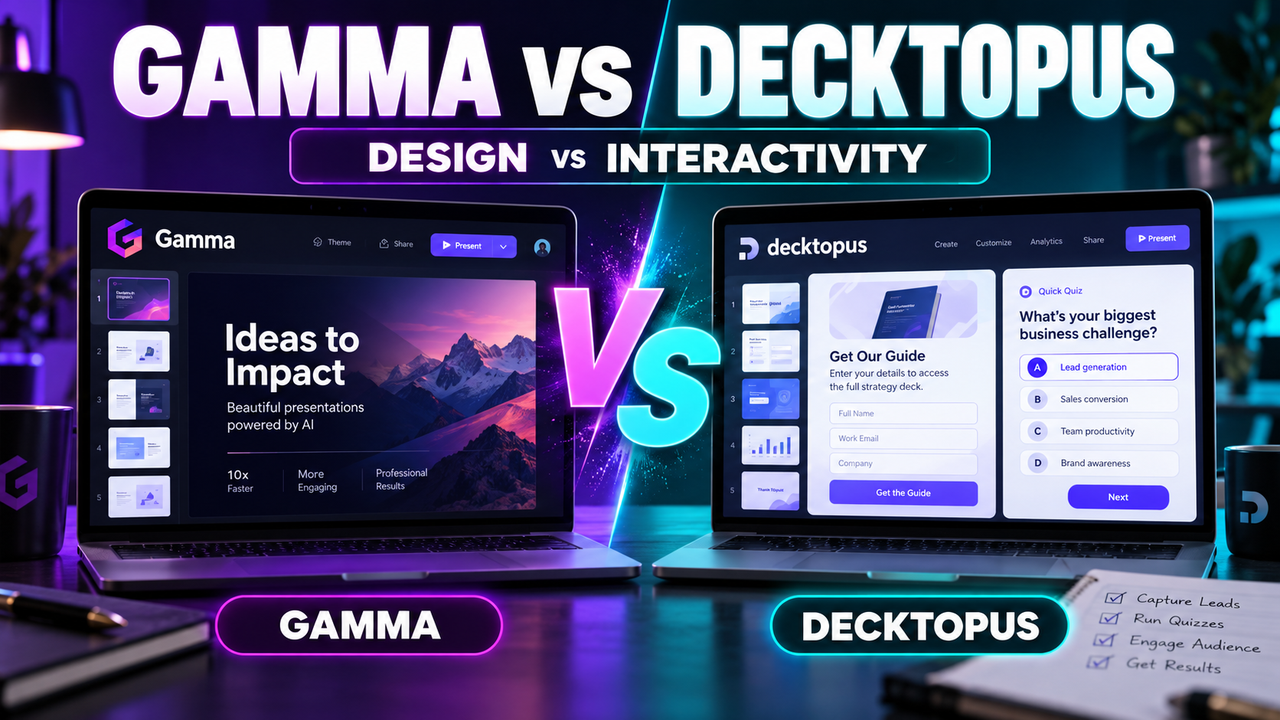
If you've narrowed your AI presentation search down to Gamma and Decktopus, you've picked two tools that look similar on the surface and behave very differently in practice. Both turn a prompt or a document into a finished deck in a couple of minutes. But one is built around design and polish, and the other is built around interaction and lead capture — and that difference decides which one is right for you.
Here's the short version before we go deep.
Quick verdict: Choose Gamma if you care most about how the deck looks and you want flexible, design-forward slides you can export cleanly to PowerPoint, PDF or Google Slides. Choose Decktopus if you want the fastest possible path from idea to a shareable, interactive deck — with built-in forms, quizzes and Q&A — and you value hand-holding over design control. Neither is "better." They're aimed at different jobs.
Let's break down exactly where each one wins.
At a glance: Gamma vs Decktopus
| Gamma | Decktopus | |
|---|---|---|
| Core idea | Design-led AI decks & docs | Fast, guided, interactive decks |
| Free plan | Yes — 400 one-time credits, "Made with Gamma" badge | Yes — ~100 credits (~3–4 decks) |
| Entry paid plan | Plus, ~$9/mo (billed annually) | Pro, |
| Higher tier | Pro ~$18/mo; Ultra ~$90/mo | Business ~$34.99/user/mo |
| Generate from a prompt | Yes | Yes |
| Document/PDF → deck | Yes (paste, import, URL) | Yes (Word/PDF) |
| PowerPoint (PPTX) export | Yes — all plans | Yes — but formatting can break on complex layouts |
| Google Slides export | Yes | No native export |
| Interactive forms / Q&A | No | Yes — a signature feature |
| Speaker notes / scripts | Basic | AI-generated notes and scripts |
| Animations | Limited | None |
| Best for | Design quality, flexible output | Speed, lead capture, beginners |
Pricing and features change often — confirm the current figures on each tool's site before you commit.
How they generate a deck
Both tools follow the same broad flow: you give them a topic or some source material, they draft an outline, and then they build out slides with text, layout and images. The experience of using them is where they split.
Gamma treats generation as a starting point for a polished artifact. You can start from a one-line prompt, paste in a chunk of text, or import an existing file or URL, and Gamma produces "cards" — its flexible take on slides — that look genuinely good out of the gate. Its editing model is closer to a modern doc-meets-deck hybrid: you nudge layouts, restyle in a click, and lean on its templates and themes. If you've read our guide on how to turn a document or PDF into slides with AI, Gamma is one of the tools that does this cleanly.
Decktopus treats generation as a guided workflow. You tell it what the deck is for — a pitch, a lesson, a proposal — and it walks you through a structured setup, then generates a complete deck with a consistent theme, speaker notes and even suggested scripts. It's arguably the more beginner-friendly of the two: it makes more decisions for you, which means less to fiddle with and less to get wrong. The trade-off is less creative control.
If your instinct is "I want it to look sharp and I'll tweak it," Gamma suits you. If your instinct is "just build me something solid and tell me what to say," Decktopus suits you.
Design and output quality
This is Gamma's home turf. Its themes are modern, its typography and spacing are careful, and the decks it produces tend to need less cleanup before they're presentable. For anyone whose slides represent them — founders, consultants, marketers — that polish matters.
Decktopus produces clean, consistent decks, but its design ceiling is lower. Templates are functional rather than striking, and notably, Decktopus has no text or image animations — every element appears at once, with no entrance or emphasis effects. For a lot of business decks that's fine; if you want motion and visual drama, it's a real limitation.
There's also an export nuance that matters if your workflow ends in PowerPoint. Gamma exports to PowerPoint, PDF, PNG and Google Slides across all plans, and the results hold up reasonably well. Decktopus does offer PowerPoint export, but reviewers consistently note formatting issues on complex layouts — the editable PPTX can drift from what you designed. If you live in PowerPoint or Google Slides, Gamma is the safer bet. (For more on that specific need, see can AI create a PowerPoint presentation.)
Interactivity and lead capture: Decktopus's secret weapon
Here's where Decktopus flips the script. It isn't really trying to be the prettiest deck tool — it's trying to be the most useful deck tool for people who want their presentation to do something.
Decktopus bakes in:
- Forms and lead capture — collect email addresses or responses directly inside the deck.
- Interactive Q&A and quizzes — turn a passive deck into something the audience engages with.
- Response tracking (on the Business plan) — see what people submitted.
- AI-generated speaker notes and scripts — genuinely helpful if you're nervous about what to say.
- Custom domains and web sharing — send a live link rather than a file.
If you're building a lead magnet, a course, an interactive proposal or a webinar deck, these features are the whole point, and Gamma simply doesn't offer them. This is the single biggest reason to pick Decktopus over Gamma, and it has nothing to do with design.
Gamma, by contrast, keeps its analytics and sharing simpler and focuses its energy on the slides themselves.
Pricing compared
Both have a free plan, and both gate the good stuff behind credits and paid tiers.
Gamma:
- Free — 400 one-time credits (not monthly), decks carry a "Made with Gamma" badge, but you still get full export (PDF, PPTX, PNG, Google Slides).
- Plus — around $9/seat/month billed annually ($108/yr), 1,000 credits/month, watermark removed.
- Pro — around $18/seat/month ($216/yr), 4,000 credits/month.
- Ultra — around $90/seat/month for heavy users.
Gamma's credit model is friendlier than it looks: standard presentation and image generation is included on paid plans, and credits are mainly consumed by advanced AI actions.
Decktopus:
- Free — about 100 credits, enough for 3–4 presentations.
- Pro — $14.99/month ($180/year), roughly 750 credits (~25 AI decks).
- Business — $34.99/user/month ($420/year), 1,000 credits/user plus form response tracking.
- Enterprise — custom.
On raw entry price, Gamma's Plus tier is cheaper than Decktopus Pro. But the comparison isn't apples-to-apples: you're partly paying Decktopus for the interactive layer, not just slide generation. If you'll never use forms or Q&A, Gamma gives you more polish per dollar. If you will, Decktopus earns its price. For a wider view of free options, our roundup of the best free AI presentation tools covers where each free tier really lands.
Who should use Gamma
Pick Gamma if you are:
- A founder, consultant or marketer whose slides need to look professional with minimal cleanup.
- Someone who wants to export a clean editable PowerPoint or Google Slides file.
- A person who likes to start fast but keep creative control over layout and style.
- Building content-heavy decks, docs or web pages (Gamma does all three).
Who should use Decktopus
Pick Decktopus if you are:
- A beginner who wants the tool to make the hard calls and hand you a finished, on-message deck.
- Building interactive decks — lead-capture forms, quizzes, Q&A, course material.
- Someone who wants AI-written speaker notes and scripts to present confidently.
- Sharing decks as live web links rather than downloadable files.
The honest bottom line
Gamma and Decktopus aren't really competitors so much as tools for two different mindsets. Gamma is a design-first AI deck maker with clean multi-format export — the better choice when the deck itself is the deliverable and appearance matters. Decktopus is an interaction-first deck builder — the better choice when the deck is a vehicle for engagement, lead capture or teaching, and you want maximum guidance with minimum fuss.
If you're still weighing the wider field, it's worth putting both next to alternatives like Beautiful.ai, Canva and Pitch before deciding — and our framework for how to choose an AI presentation tool walks through the questions that actually matter.
Frequently asked questions
Is Gamma or Decktopus better for beginners? Decktopus is more beginner-friendly — it guides you through setup and makes more design decisions for you. Gamma is still easy, but it gives you more to adjust.
Which one exports to PowerPoint properly? Gamma's PowerPoint export is more reliable across all plans. Decktopus can export to PPTX but may lose formatting on complex layouts.
Does either have a free plan? Yes. Gamma gives 400 one-time credits with a "Made with Gamma" badge; Decktopus gives around 100 credits (3–4 decks). Both are enough to test the tool properly.
Can Decktopus collect leads from a presentation? Yes — that's its standout feature. You can embed forms, quizzes and Q&A, and track responses on the Business plan. Gamma doesn't offer this.
Which is cheaper?
Gamma's entry paid plan ($9/mo annual) is cheaper than Decktopus Pro ($14.99/mo). But Decktopus's price includes its interactive tools, so compare based on whether you'll use them.
Prices and features were checked in September 2026 and change frequently — always confirm on the official sites before subscribing.
Listings related to Gamma vs Decktopus: Which AI Presentation Maker Should You Use?

Gamma
An AI presentation maker that turns a prompt or a pasted document into a finished-looking deck in about a minute. A standalone web app — great free plan for on-screen decks, but clean PowerPoint export and branding are paid.
Decktopus
A guided, opinionated AI deck builder for non-designers that generates the slides plus delivery extras — speaker notes, audience Q&A, lead-capture forms, voiceover and hosting. Cheap entry point; no true free plan.

Beautiful.ai
A standalone AI presentation app built on rule-based smart templates that auto-format every slide. Built for business teams who want on-brand, consistent decks without manual design — no free plan, editable PowerPoint export on every paid tier.
Canva
The presentation side of Canva's all-in-one design suite, with Magic Studio AI turning a prompt or document into an editable, template-based deck. Easiest on-ramp, generous free tier, editable PowerPoint in and out — but a generalist, not a specialist.
Pitch
A collaborative AI presentation tool that has grown into a "complete pitching platform" — shared teamspaces, AI deck generation, and trackable Pitch Rooms with engagement analytics. Built for sales and go-to-market teams, not solo one-off decks.